2D & 3D art & animation
How to Optimize Roblox Art for Better Performance (Low-Poly Tips)

 Nov 24, 2025



In Article:
Key Takeaways
In the world of Roblox game development, creativity meets engineering. Thousands of developers bring their worlds to life every day, crafting vibrant cities, mystical landscapes, and dynamic characters. But behind every immersive experience lies a critical challenge performance.
A stunning game filled with high-polygon models and unoptimized textures can quickly become a lag-filled frustration, especially on mobile devices or lower-end hardware. That’s where art optimization steps in — specifically low-poly art design and efficient handling of roblox mesh assets.
Low-poly design isn’t just a stylistic choice; it’s a performance strategy. It focuses on building efficient, visually appealing assets that load faster, run smoother, and keep players engaged longer. By learning how to optimize Roblox art, developers can create games that look great and perform even better across all devices.
In this comprehensive guide, we’ll explore the full process of Roblox art optimization — including modeling, textures, lighting, and best practices for low-poly design. You’ll discover how to balance visual appeal with speed and scalability, ensuring your Roblox creations deliver both beauty and performance.
Art optimization plays a crucial role in determining how efficiently your Roblox game performs. Every model, texture, and light source you add consumes memory and processing power. The more complex the assets, the higher the demand on the user’s device — which can result in frame drops, loading delays, and server lag.
Optimization ensures that your assets maintain a balance between quality and efficiency. For Roblox, this is even more vital because the platform supports a wide range of devices — from powerful PCs to mobile phones and tablets. A game that runs smoothly on all these platforms reaches a larger audience and keeps players engaged longer.
Why optimization matters:
A well-optimized game feels polished, professional, and player-friendly. It demonstrates that the developer has not only creative talent but also technical mastery — a balance that defines successful Roblox games.
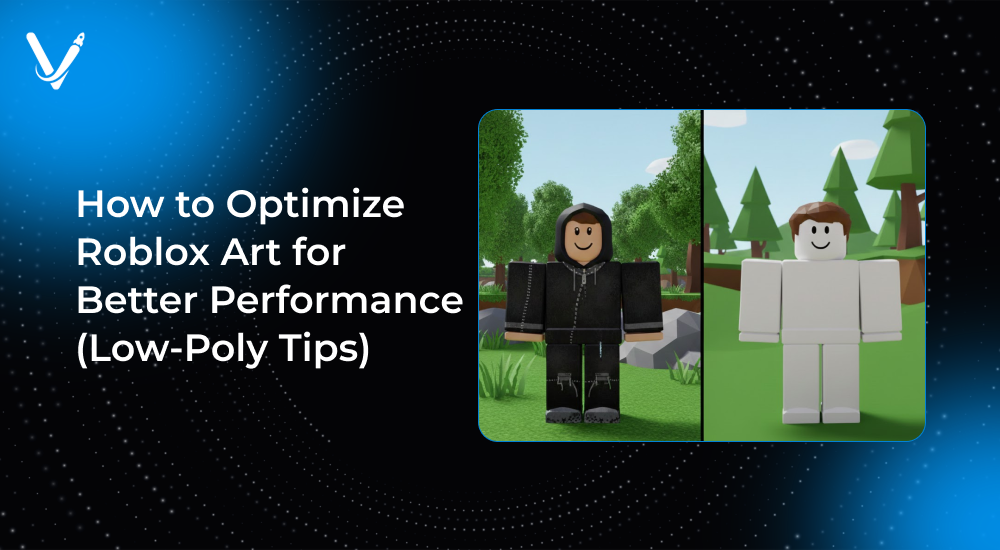
Low-poly design refers to the art of creating 3D models using a relatively small number of polygons (triangles and faces). Each polygon adds detail but also increases computational complexity. The more polygons a model has, the more processing power it takes to render it.
In Roblox, low-poly art isn’t just an aesthetic choice — it’s a necessity for performance. Roblox’s engine is designed to run efficiently across different systems, and low-poly assets help maintain consistency and speed across devices.
Low-poly design works by focusing on implied detail rather than literal detail. Instead of modeling every brick, leaf, or rivet, developers use textures, shading, and clever geometry to create the illusion of depth and richness.
Advantages of low-poly art for Roblox:
Many of the most popular Roblox games — such as Brookhaven RP, Adopt Me!, and Tower of Hell — use optimized, stylized low-poly environments that are efficient yet visually pleasing.
Optimizing Roblox art is both an art and a science. It involves careful modeling, efficient texturing, and smart design choices. Let’s break down the fundamental areas where developers can make a big performance impact.
The fewer polygons your models contain, the faster they render. Focus on simplicity and silhouette rather than intricate surface detail.
A good rule of thumb is to model what’s visible to the player. If certain areas are never seen (like the underside of a building), there’s no need to detail them.
Textures are one of the biggest contributors to memory load. Efficient texture design can drastically reduce file size and improve rendering performance.
When working with a roblox mesh, always ensure it is optimized and cleaned before importing to avoid unnecessary polygon load.
Clean topology ensures that your models deform well, light correctly, and render efficiently. Avoid long, stretched faces or unnecessary edge loops.
For UV mapping:
This not only helps with visual quality but also ensures that baked textures (like ambient occlusion or light maps) appear clean and consistent.
Instead of creating new models for every object, design modular components that can be reused. For example, one window or door model can fit multiple buildings with different colors or textures.
This approach saves time, reduces file size, and simplifies updates later. Reusing assets also improves memory efficiency since repeated models can be rendered using the same mesh data.
Roblox’s MeshPart system makes this easy — once uploaded to the asset library, a single mesh can be reused multiple times without duplication.
Transparency and reflections can significantly impact performance because they require additional rendering passes. While they add realism, overusing them can slow down the game.
Use transparency only when necessary — such as for windows, water, or glass effects — and try to keep transparency layers minimal. For reflections, rely on EnvironmentReflections or baked lighting instead of real-time reflections.
Collision detection consumes computational resources. Complex meshes with detailed collision surfaces increase the processing load on Roblox’s physics engine.
To optimize:
This ensures smoother physics simulation and reduces CPU strain during gameplay.
Real-time lighting is one of the most resource-intensive operations in Roblox. By baking lighting — pre-calculating light and shadow information — you can achieve realistic visuals without the runtime performance hit.
Baked lighting uses textures or vertex colors to simulate illumination. Roblox Studio’s Lighting properties allow you to switch between real-time and baked light modes.
For better results:
This method keeps your scenes visually rich while maintaining high frame rates.
Low-poly design isn’t just about reducing polygons — it’s about mastering the illusion of depth and complexity. Here are the key techniques that elevate low-poly Roblox art to professional quality.
The shape of a model — its silhouette — defines how easily players recognize it. Even with few polygons, a strong silhouette communicates the object’s identity.
When designing, zoom out or view your model against a neutral background to evaluate its outline. If the shape reads clearly, it’s likely effective even at low detail levels.
Textures can carry visual weight without increasing polygon count. Instead of modeling fine details like bricks or cracks, bake them into a diffuse or normal map.
In tools like Blender or Substance Painter, you can project high-resolution detail onto a low-poly mesh, retaining visual richness while keeping geometry light.
This “bake and fake” method is a cornerstone of modern low-poly optimization.
Level of Detail (LOD) models dynamically adjust complexity based on distance from the camera. Roblox automatically manages rendering for distant objects, but custom LODs can provide finer control.
For example:
Implementing LOD models keeps the game running smoothly even in large open-world environments.
Low-poly doesn’t mean low-quality. Many top Roblox games use stylized art to create charming, cohesive visuals. Bold colors, simple shading, and clean forms enhance appeal while minimizing performance cost.
Stylization also allows you to bypass the need for hyperrealism, which typically demands higher polygon counts and complex shaders. A consistent art direction can make even the simplest assets feel intentional and polished.
Animations contribute to CPU and GPU load, especially in character-heavy scenes. Keep rigging simple and avoid excessive bones or keyframes.
For static props that need movement, use tweening or rotation scripts instead of full skeletal animation. This achieves motion without the heavy cost of rigged animations.
Decals are a great way to add variety without increasing mesh complexity, but overuse can cause performance drops. Limit decals to key visual elements and use compressed textures.
SurfaceAppearance in Roblox supports advanced material properties, but use them selectively. Too many reflective or detailed surfaces can overload rendering, particularly on mobile.
Textures are a silent performance killer if not handled properly. To keep your Roblox experience smooth, follow these best practices.
Game engines prefer textures sized in powers of two (like 128x128, 256x256, 512x512). This allows efficient compression and mipmapping.
Avoid unusual resolutions such as 300x600 — they waste memory and can cause visual glitches.
Always compress textures before uploading. Compressed formats load faster and consume less GPU memory. PNG is ideal for transparency, while JPEG suits large opaque textures.
For in-game surfaces, try keeping texture files under 1MB whenever possible.
If multiple assets share similar materials, reuse the same texture to reduce draw calls. For instance, one wood texture can serve multiple furniture pieces.
This approach helps Roblox’s renderer process fewer unique materials, improving overall performance.
A texture atlas combines multiple small textures into a single large file. This reduces the number of texture switches during rendering, which boosts frame rate.
You can create atlases in software like TexturePacker or manually in Photoshop. Ensure each sub-texture is neatly aligned and UVs are adjusted accordingly.
While normal maps add depth, they can be heavy for Roblox’s rendering pipeline. Use them sparingly or bake simple surface variation directly into diffuse textures instead.
Lighting can make or break performance. Realistic illumination enhances atmosphere, but unoptimized setups can cripple frame rates.
Best practices for efficient lighting:
Stylized lighting with gradient tones often performs better and aligns perfectly with low-poly aesthetics.
Roblox Studio provides powerful built-in tools for analyzing performance.
Performance Stats Panel (Shift + F3): Displays FPS, memory usage, network latency, and rendering load.
MicroProfiler (Ctrl + F6): Offers detailed breakdowns of CPU and GPU tasks.
Rendering Stats: Shows triangle counts, draw calls, and texture usage.
Regular testing across different devices ensures your optimization efforts hold up in real-world conditions.
The secret to great optimization lies in balance. Stripping too much detail can make assets feel lifeless, while excessive realism can cause lag. The goal is to find that sweet spot — where visuals feel rich but performance remains smooth.
To achieve this:
A well-optimized Roblox experience not only performs well but also scales beautifully across platforms.
Look at popular Roblox titles like Welcome to Bloxburg, Adopt Me!, or Tower Defense Simulator. These games manage large player bases and expansive environments through careful optimization.
Their art styles favor simplicity — flat colors, modular structures, and low-poly assets. Despite their simplicity, these worlds feel alive due to clever use of lighting, sound, and animation.
By focusing on performance-oriented design, these developers created games that look good, run fast, and maintain engagement across millions of players.
Artificial Intelligence is beginning to influence asset creation in Roblox. AI-powered modeling tools can automatically reduce polygon counts, retopologize meshes, and generate optimized UVs.
Machine learning-based upscaling tools can also create high-quality textures from low-resolution sources, preserving clarity while reducing file size.
Vasundhara Infotech and other leading game tech companies are exploring AI-driven art pipelines that streamline optimization — ensuring faster production cycles and consistent performance.
Optimizing Roblox art for better performance isn’t just about cutting polygons — it’s about designing smarter. Each texture, light, and mesh plays a role in shaping how smoothly your game runs.
By adopting low-poly principles, efficient texturing, and baked lighting, you can deliver visually appealing experiences that perform beautifully on all devices.
When done right, optimization doesn’t limit creativity — it enhances it. It allows developers to focus on storytelling, gameplay, and player engagement without being held back by technical constraints.
Vasundhara Infotech empowers creators with cutting-edge game design expertise, offering tailored solutions for Roblox development, low-poly modeling, and performance optimization. If you’re looking to elevate your Roblox experience with stunning visuals that run flawlessly, our team can bring your vision to life.
Ready to create your next performance-optimized Roblox world?
Partner with Vasundhara Infotech — where creativity meets innovation.
Copyright © 2026 Vasundhara Infotech LLP. All Rights Reserved.